Post bug reports here!

Inventory follows the order of the variable definitions in the story editor.
It would be good to have priority system where each variable can be assigned a number on the story-wide variable editing page.
Default could be 0. Higher numbers might be ordered further up in any context. If two variables have the same number, the order of creation in the Score can take precedent again.
 
Multiplication is not working


{action "Test" if game:Health >100 set game:LV = game:LV+5} works

{action "Test" if game:Health >100 set game:LV = game:LV-5} works

{action "Test" if game:Health >100 set game:LV = game:LV/5} works

{action "Test" if game:Health >100 set game:LV = game:LV*5} throws Invalid Action state changes formula: Unexpected character '\'
 
{action "Test" if game:Health >100 set game:LV = game:LV*5} throws Invalid Action state changes formula: Unexpected character '\'

Might this be related to Markdown conversion?

When RTE is active, the WYSIWYG will be converted into plain Markdown.
Markdown uses * for italics so *italics* will become italics.
If you use plain Markdown and want to have an asterisk in your chapter, you need to escape it like \*.
The conversion might do the same when saving a chapter, so * might become \*.
Thus, the parser might then lead the \ and breaks.

If that is the issue, I guess it might be possible to either deactivate RTE to Markdown Conversion within braces, or allow an alternative operator \* for multiplication.

(You could test that by deactivating the Richt Text Editor in the settings, though you shouldn't change the setting while you have any edit chapter page open as that might ruin the formatting.)
 
Turning off RTE does allow multiplication to work for me. The formula I originally mentioned works with RTE off:

{action "Add Sense" once set game:catseyeroll += (game:sense + game:sensemod) * 2}

It'd be ideal if there was a solution with RTE on, but that should explain why it seemingly has been working for some folks and not others.
 
The tricky part is that (like I gather many game story makers are doing) I have defined the variables in the chapters in which they first appear instead of all at the front. When doing so, the game variables do not show in the main "Edit Story" view, so I'm not able to rearrange them there. Is there a workaround?

Also, thanks for addressing all the other stuff!
It would be good to have priority system where each variable can be assigned a number on the story-wide variable editing page.
Default could be 0. Higher numbers might be ordered further up in any context. If two variables have the same number, the order of creation in the Score can take precedent again.

Thanks for explaining, and for the suggestion! I’ve now added Display priority to the Story variables page. It works for variables introduced in chapters too, so you can leave their definitions where they are.

For your example, set Headgear to 1, Upper Body to 2, and Lower Body to 3. Lower numbers appear first; the default 0 leaves variables after the numbered ones. Variables with the same priority keep their existing order.

This applies to both Game State and inventory, including games already in progress.
 
Multiplication is not working


{action "Test" if game:Health >100 set game:LV = game:LV+5} works

{action "Test" if game:Health >100 set game:LV = game:LV-5} works

{action "Test" if game:Health >100 set game:LV = game:LV/5} works

{action "Test" if game:Health >100 set game:LV = game:LV*5} throws Invalid Action state changes formula: Unexpected character '\'
Might this be related to Markdown conversion?

When RTE is active, the WYSIWYG will be converted into plain Markdown.
Markdown uses * for italics so *italics* will become italics.
If you use plain Markdown and want to have an asterisk in your chapter, you need to escape it like \*.
The conversion might do the same when saving a chapter, so * might become \*.
Thus, the parser might then lead the \ and breaks.

If that is the issue, I guess it might be possible to either deactivate RTE to Markdown Conversion within braces, or allow an alternative operator \* for multiplication.

(You could test that by deactivating the Richt Text Editor in the settings, though you shouldn't change the setting while you have any edit chapter page open as that might ruin the formatting.)
Turning off RTE does allow multiplication to work for me. The formula I originally mentioned works with RTE off:

{action "Add Sense" once set game:catseyeroll += (game:sense + game:sensemod) * 2}

It'd be ideal if there was a solution with RTE on, but that should explain why it seemingly has been working for some folks and not others.

Thanks everyone for helping track this down, and sorry for the delay! You were right about the Markdown conversion. It was adding a backslash before *. A fix is now live, so multiplication should work with the rich text editor enabled. Please let me know if you still run into any issues!
 
The 'no view count update at 14:00 UTC' bug came back again, starting on September 15.

Thanks for reporting this again. The daily database backup has been running past 14:00 UTC, which temporarily blocks view-count updates. The earlier fix addressed a different scheduling problem, but a blocked update would still wait until the next hour to try again. Views were still being recorded. The displayed totals were just delayed.

I’ve now deployed a change so blocked updates retry every minute and catch up as soon as the backup finishes. Counts can still be delayed during the backup itself, but there should no longer be that extra wait afterward.
It's an super trivial issue that I only keep bringing up because it makes my spreadsheet ugly. Thanks for obliging me. :P
 
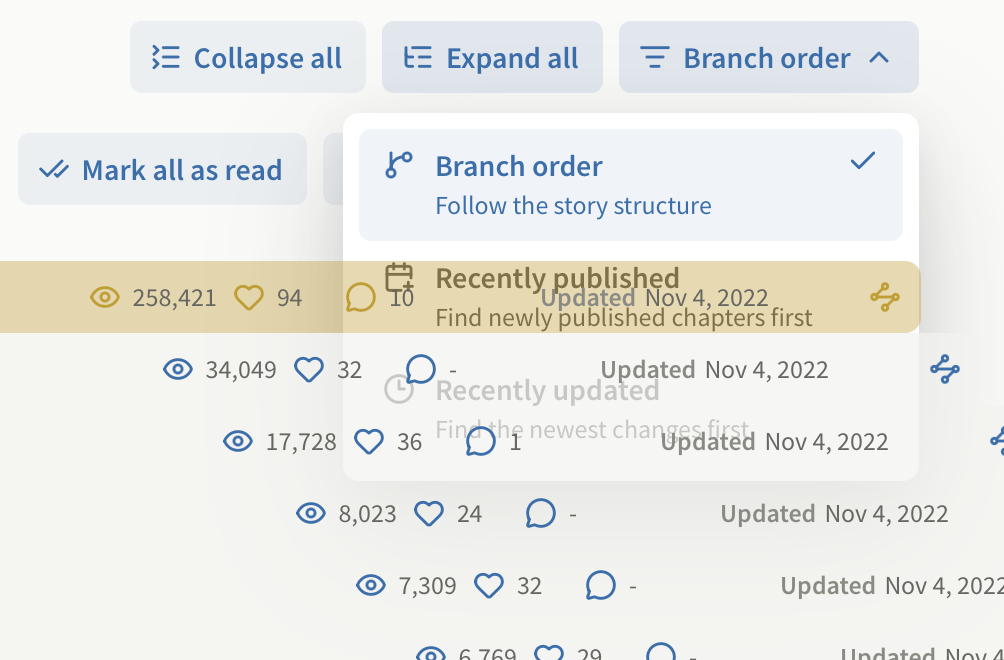
The "Branch Order" dropdown menu in the Story Map (in all stories I've tried) has become unclickable - the bottom two options are faded out, and trying to click on them results in clicking on the branch options that they're supposed to be covering up. I'm on a desktop computer, using Safari 27.0.1 in MacOS 27.0.1.

branchorder.jpg

Thanks for reporting this, and for the screenshot! I’ve fixed it. Let me know if you still run into any trouble!
 
Award weirdness. I like to look through the news feed as it has lead to some interesting stories. Saw these and was interested to check out this new writer's first story on here.

1794503833598.png

Except they only have one story, which only has one chapter and that was put up on the site in Feburary.

1794503919781.png

Just thought it was a weird oddity.
 
The site said it was down for a bit, then I had to log back in, and now it doesn't want to load my direct messages by clicking on the individual threads, have to open "all messages". But even after doing that, it won't let me send a new message.

I'm assuming there's something buggy going on here?
 
Suddenly ------------------- are being automatically converted to graphical horizontal dividers. I haven't been using these because the issue of them becoming irremovable if they ever happen to be at the bottom of a draft has never been fixed, and having the workaround (dashed lines) automatically converted to them is a major problem. I have multiple drafts (and a few published chapters) that now have undeletable horizontal dividers at the bottom. You can type above them, you can type below them (but text appears above them even if the cursor was below), but they cannot be removed by any means I can find.
 
Last edited:
Any time you accidentally forget a space between sentences, the editor parses this instantly into a link. "Thought.He" immediately becomes a link to nothing that persists even if you go back and add the space. you have to completely delete all the text involved and retype to get the link to stop.
 
Back
Top